AI Plant Doctor: Plant Care
- 4.4
- Rating
- 100.00K
- Installs
- Free
- Price
 Analysis by App-foxy
I downloaded AI Plant Doctor: Plant Care expecting a quick plant-identification tool, but I ended up judging it by a more practical question: would I still open it after the first week, when the novelty of pointing a camera at a leaf has worn off? That is the right way to look at this House & Home app from JodAI. Its appeal is immediate because it brings plant identification, health checks, and care reminders into one place. Its lasting value depends on whether those tools become part of a routine rather than a one-time experiment.
The app is free to install and suitable for Everyone, which makes it easy to try without much commitment. It has reached over 50 thousand installs and holds a 4.4 average from more than 400 ratings, so there is already a modest user base behind it. I would not treat those numbers as proof that every diagnosis is reliable, but they do suggest that the concept is connecting with people who want help caring for houseplants without becoming gardening experts.
From an easy first scan to a real plant-care routine
My first impression was shaped by how little preparation the idea requires. When I do not know the name of a plant, the obvious alternative is to search through photos, ask in a gardening group, or compare several care guides. Those methods can work, but they also create friction. An AI-based plant doctor offers a more direct starting point: identify what is in front of me, then use that information to think about care.
You May Also Like

 Blood Strike: 2.5 Anniversary
Blood Strike’s Loadouts Turn Every Drop Into a Tactical Gamble
A close look at Blood Strike’s custom loadouts: how fast access to signature weapons reshapes its battle royale rhythm, rewards preparation, and narrows the gap between fights.

 Pandora - Music & Podcasts
Pandora’s Music Is Easy to Start, but Harder to Recover
Pandora’s strength is its low-effort path from a seed to a station. Its weak spot is how much confidence it asks you to place in connection, setup, and quiet recovery.

 8 Ball Pool
 Is Built on Rivalries, Rematches, and Routine
A close look at the rivalries, rematches, shared routines, and unanswered safety questions that turn a quick pool match into a persistent mobile community.

 Samsung Music
’s Quiet Strength Is Playing What You Already Own
Its reach comes less from spectacle than from dependable access to a personal library. That simplicity is both the app’s strongest retention engine and its ceiling.

 AccuWeather: Weather Radar
AccuWeather Review: A Quick, Clear Forecast for Everyday Decisions
For everyday plans, the best forecast is the one you can understand quickly. AccuWeather makes rain timing, radar, and local conditions easy to act on, with a few trade-offs.

 Hill Climb Racing
Why Hill Climb Racing Still Turns Crashes Into One More Run
A tiny car, a bumpy hill and one more upgrade: Hill Climb Racing keeps resurfacing because its simple chaos makes every near-miss feel personal.
More From Our News Desk



That is especially useful when a plant arrives without a label. A new houseplant from a market, a cutting shared by a friend, or an older plant inherited from someone else can all become easier to organize once I have a likely identity. The important word is “likely.” A photo-based result should be treated as a helpful lead, not as botanical certainty. Similar foliage, unusual cultivars, poor lighting, and damaged leaves can all make visual recognition harder.
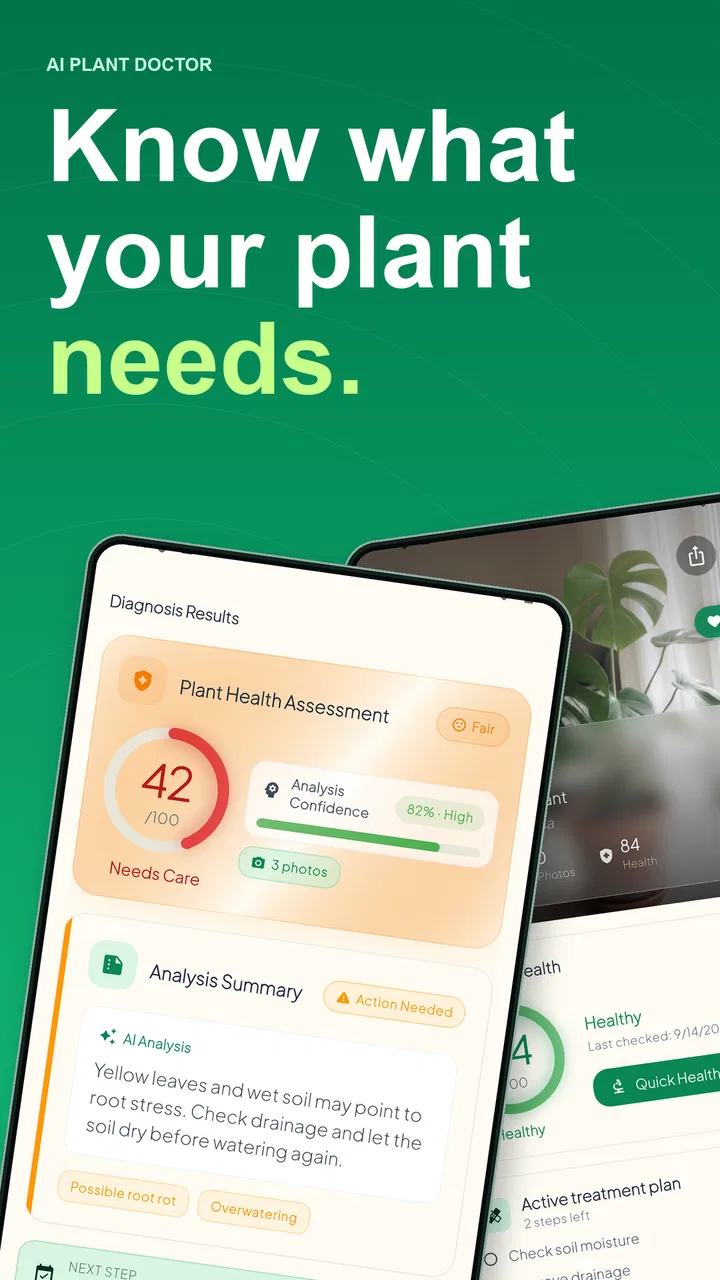
The first week is also when the health-diagnosis angle feels most engaging. A yellow leaf or dusty patch naturally makes me want to take a picture and see whether the problem looks familiar. This can stop me from reacting randomly. Instead of immediately adding fertilizer, moving the pot, or watering again, I can pause and inspect the visible symptoms. The best early habit is using the diagnosis to slow down impulsive care.
That distinction matters because many plant problems look alike from a distance. Yellowing may relate to watering, light, age, roots, or another stress. A camera-based suggestion cannot inspect the soil beneath the pot or feel the roots. I found the app more useful as a prompt for investigation than as a final authority. After a scan, I would still check the soil, drainage, recent changes in light, and the condition of the stems.
The reminder side gives the app a more durable purpose than identification alone. A plant-ID tool may be useful once, but reminders can bring me back when the initial curiosity has disappeared. This is where the product begins to resemble a lightweight care notebook. Instead of trusting memory for every pot, I can use a digital cue to remember that a plant needs attention.
Still, I would avoid interpreting a reminder as an automatic instruction to water. A calendar cannot feel moisture, notice a sudden cold draft, or know whether a pot is drying slowly in winter. I prefer to use a reminder as a check-in: inspect the soil and leaves first, then decide what the plant actually needs. That small adjustment makes the feature safer and more realistic for everyday use.
What makes the first week genuinely useful
For a beginner, the strongest workflow is to start with the plants that cause the most uncertainty rather than scanning every leaf in the home. I would identify an unlabeled plant, record its result, and then use the care guidance as a starting framework. After that, I would photograph a visibly troubled plant in good natural light and compare the suggested issue with what I can observe directly.
Taking clearer photos is one of the simplest ways to get more value. I would avoid glare, include the whole leaf when the symptom is spread across it, and take a closer image when the problem is a small spot or edge. A single blurry picture encourages false confidence. Multiple views give me a better basis for deciding whether the issue is widespread or limited to one damaged section.
Another useful approach is to scan before making a major change. If I move a plant to a brighter window and then immediately water or feed it, I will not know which action affected it. Using the app as part of a simple observation routine helps separate cause from coincidence. That is a more advanced use than simply asking, “What plant is this?”
Where the month-to-month value comes from
After the first few weeks, identification becomes less important for plants I already know. The recurring value has to come from monitoring and reminders. I can imagine the app being most helpful in a home with several plants that have different rhythms. Without a system, I tend to remember the dramatic plants and overlook the quiet ones until a leaf changes color.
This is also where expectations need to stay grounded. A reminder system can improve consistency, but it cannot replace observation. Plants do not follow a perfectly fixed schedule because light, temperature, pot size, soil mix, and season all influence how quickly they dry. The app is more valuable when I treat its reminders as recurring prompts to inspect rather than rigid appointments.
For someone who travels or has an irregular working week, that prompt can still be worthwhile. I might check plants on a weekend, note which ones are genuinely dry, and use the app to keep the next inspection from disappearing from memory. The practical benefit is not that the application magically knows the condition of every pot; it is that it gives plant care a visible place in my routine.
A realistic everyday scenario would be a busy apartment owner with a few plants spread across different rooms. On a Sunday morning, I could review the reminders, walk around with the phone, inspect the soil, and photograph any leaf that looks different. One plant may need water, another may need a brighter position, and a third may simply have an old leaf. The app can help me start that round, while the final decisions still come from physical checks.
For larger collections, the value becomes more dependent on organization. If I add plants without keeping names, locations, or observations clear, the reminder stream can become less meaningful. The app is not a substitute for a sensible collection system. I would keep notes consistent and avoid creating unnecessary entries for temporary experiments. A smaller, cleaner record is more useful than a crowded one that I stop trusting.
There is also a learning benefit. Repeatedly comparing a suggested diagnosis with what happens afterward can sharpen my own judgment. I may begin noticing that one plant reacts badly to a dark corner, while another stays wet much longer in the same room. Over time, the app works best as a companion to that learning process, not as a replacement for it.
The maintenance burden behind the convenience
The app itself is easy to try, but maintaining useful information requires regular attention. I need to take readable photos, keep plant entries understandable, and respond to reminders instead of dismissing them automatically. That is not a serious burden for a small collection, but it becomes work if I expect the app to manage every detail of a large indoor jungle.
The biggest maintenance mistake would be setting reminders and then following them mechanically. If I water every time an alert appears, I may create the very problems I hoped the app would prevent. I would rather use each alert as a short inspection step: touch or check the soil, look under the leaves, consider recent weather and room conditions, and only then act.
Diagnosis also needs a careful workflow. A scan is most useful when I record what I saw before changing anything. If I remove damaged leaves, spray a treatment, move the pot, and alter watering on the same day, I lose the ability to understand what helped. A better routine is to make one reasonable adjustment, observe the plant, and use a later scan if the problem continues.
This may sound more methodical than some people want from a simple home app, but it is exactly where the product can earn long-term value. Plant care is full of delayed results. A quick answer is satisfying, while a repeatable process is what actually prevents avoidable mistakes. I appreciate the app more when it encourages that process than when I expect it to produce a perfect answer from one image.
There is a financial consideration as well. The app is free, but in-app purchases range from ninety-nine cents to $57.99 per item. That does not automatically make it poor value, yet it means I would try the free experience first and decide whether the recurring workflow genuinely helps me before paying for anything. Someone with only one hardy plant may never need to spend money. A collector who uses the identification and monitoring tools often may judge the cost differently.
Where fatigue can set in
The main source of fatigue is repetition. Scanning a new plant is fun; scanning the same plant repeatedly without a clear reason can feel like administrative work. Reminders can also become background noise if they arrive too often, arrive at inconvenient times, or do not match the actual drying pattern of a pot. The more alerts I ignore, the less useful the whole system feels.
There is a second kind of fatigue: uncertainty. If a diagnosis offers several plausible causes, a beginner may still wonder what to do next. That is not necessarily a flaw in the concept, because plant symptoms genuinely overlap, but it limits how much confidence I would place in an automated result. I would be cautious about using the app alone for pests spreading quickly, severe root problems, or a valuable plant where a wrong treatment could make matters worse.
Photo quality can become another friction point. Indoor lighting is often poor, leaves may overlap, and symptoms can be tiny. If the result changes because the photo changes, I would not keep scanning endlessly in search of certainty. I would use the result as one piece of evidence and compare it with the plant’s environment. That approach prevents the app from turning a small blemish into an exhausting investigation.
The product may also be more than some users need. If I own one familiar plant and already know its watering pattern, a general care guide or a note on my phone could be simpler. Likewise, experienced growers who already recognize common pests and nutrient issues may prefer specialist references, local gardening communities, or a manual log. The app’s strongest audience is the person who wants structure and a second opinion, not the person who has already built a detailed horticultural system.
Compared with ordinary plant-identification apps, this one is more appealing when I want the result to lead into ongoing care rather than stop at a name. Compared with a basic reminder app, its plant-focused diagnosis gives the routine more context. But a general reminder tool can be more flexible for people who want custom schedules, while a dedicated gardening notebook may offer more control over observations. The trade-off is convenience versus depth.
I would also be careful with the phrase “plant doctor.” It is a friendly way to describe the app’s purpose, but I would not read it as professional diagnosis. A camera can recognize visual patterns, while a plant’s real condition may depend on roots, soil chemistry, insects hidden below leaves, or environmental history. For ordinary troubleshooting, that distinction is manageable. For serious or unusual cases, another source of advice is the better choice.
Who should keep it installed?
I think it earns a place on the phone for new plant owners, people who frequently forget care tasks, and households with enough plants that memory starts to fail. It is also a sensible companion for anyone who buys unlabeled plants and wants a quick starting point before researching further. The free entry point makes experimentation reasonable, and the Everyone rating keeps it approachable for a broad household audience.
I would recommend a more selective approach for experienced growers. If you already keep detailed records, understand your plants’ seasonal changes, and can identify common symptoms, the app may offer convenience without adding much knowledge. It can still be useful for an unfamiliar specimen, but I would not expect it to transform an established method.
The current version is 2.10.0 and runs on Android 7.0 or later, so compatibility should be comfortable for many older Android phones. That matters for an app intended to be used around the home, where not everyone keeps a recent device. I would still judge the experience on the phone I plan to use for plant photos, since camera quality and lighting affect the usefulness of visual tools more than the version number alone.
JodAI has positioned this as an approachable home-care app rather than a specialist botanical reference, and I think that positioning works when the user understands its limits. The product is strongest at turning vague concern into a structured check. It is weaker when I expect certainty, highly customized horticultural planning, or a complete record of every factor affecting a plant.
My long-term verdict
After the novelty fades, AI Plant Doctor: Plant Care can keep its place if I use it as a habit builder. The identification feature gets me started, the health checks give me a reason to look more closely, and reminders can prevent quiet neglect. None of those elements removes the need to observe a plant in real life, but together they make it easier to notice problems before they become dramatic.
My recommendation is to begin with a small number of plants, use clear photos, and treat every alert as an inspection rather than an automatic watering order. I would also wait before buying in-app extras, especially if my collection is small or my care routine is already reliable. The app becomes more convincing when it helps me make better decisions repeatedly, not when it simply produces an impressive first scan.
For beginners and forgetful plant owners, I think the free download is worth trying. For advanced growers, it is best viewed as a convenient second opinion rather than a replacement for experience or specialist guidance. Its lasting value is real but conditional: the app earns space through consistent, thoughtful use, not through novelty alone. That makes it a useful household companion, provided I remain the person making the final care decision.
FAQs for AI Plant Doctor: Plant Care
01What is AI Plant Doctor: Plant Care, and how does it work?
AI Plant Doctor: Plant Care is a mobile app designed to help users identify plant health issues using AI technology. Simply upload a photo of your plant, and the app will diagnose potential problems and offer remedies. It's ideal for plant enthusiasts seeking to maintain healthy plants with minimal effort.
02Is AI Plant Doctor: Plant Care available on both Android and iOS?
Yes, AI Plant Doctor: Plant Care is available for download on both Android and iOS platforms. You can find it on the Google Play Store for Android devices and the Apple App Store for iOS devices, ensuring accessibility for a wide range of users.
03What features does AI Plant Doctor offer to help with plant care?
The app provides several key features, including plant disease diagnosis, care tips, watering schedules, and reminders. Additionally, it offers a plant library for quick reference and personalized recommendations based on your plant collection, making it a comprehensive tool for plant care.
04Is the app user-friendly for beginners in plant care?
Absolutely! AI Plant Doctor: Plant Care is designed with a user-friendly interface that caters to both beginners and seasoned plant enthusiasts. The step-by-step guides, intuitive navigation, and easy-to-understand language make it accessible for anyone interested in improving their plant care skills.
05Does AI Plant Doctor: Plant Care require a subscription or in-app purchases?
While the app offers a free version with essential features, there is also a premium subscription available. The premium version includes additional features such as advanced diagnostics and personalized support. Users can choose based on their needs and budget, ensuring flexibility.
Pros
- Easy-to-use interface for all skill levels.
- Accurate plant diagnosis and care tips.
- Large database of diverse plant species.
- Offline mode for remote plant care.
- Regular updates with new plant information.
Cons
- Limited free features
- subscription needed.
- Occasional misidentification of rare plants.
- Some features require stable internet.
- In-app ads can be distracting.
- Lacks community interaction features.

AI Plant Doctor: Plant Care
Gallery